Geofencing is one of the most powerful yet underutilized features in GPS tracking. While most Ghanaian vehicle owners know their tracker can show where their car is, many don't realize they can create invisible security perimeters that alert them the moment their vehicle crosses a boundary.
This guide shows you exactly how to set up geofencing for maximum protection, with real-world examples from Accra, Kumasi, and other Ghana locations.
What is Geofencing?
Geofencing creates virtual boundaries - or "fences" - around specific geographic areas. When your vehicle crosses these boundaries, you receive instant notifications via app, SMS, or both.
Think of it as an invisible alarm system that can cover:
- Your home compound
- Your office parking
- Your children's school
- The entire Greater Accra Region
- Border areas (for theft early warning)
The key advantage: Unlike physical alarms that require someone to hear them, geofence alerts reach your phone anywhere in the world within seconds.
How Geofencing Technology Works
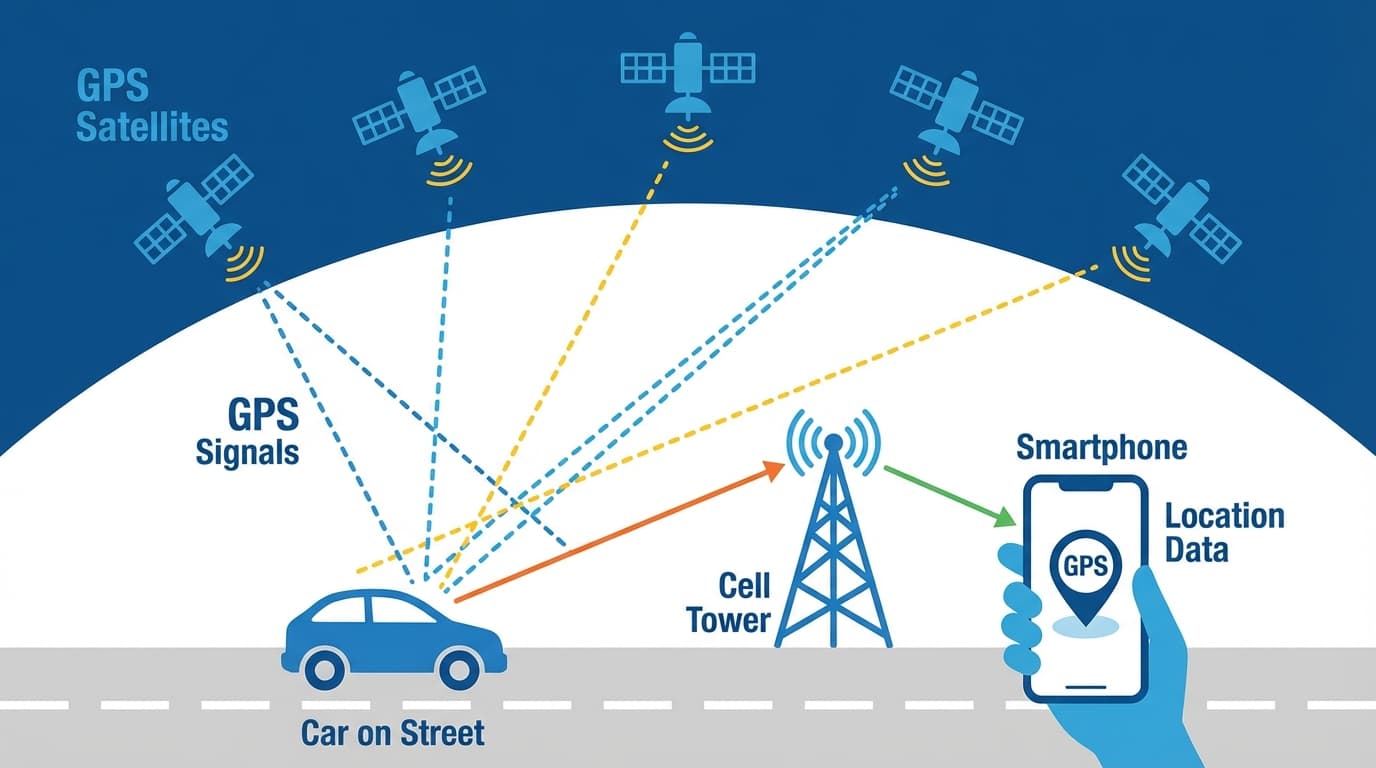
The technology combines GPS positioning with zone boundary calculations:
- GPS tracking: Your tracker continuously determines its location using satellite signals (accurate to 3-5 meters)
- Zone comparison: The tracking platform constantly checks: "Is this location inside or outside each defined zone?"
- Boundary crossing detection: When the tracker moves from inside to outside (or vice versa), the system triggers
- Alert dispatch: Notification sent via app push notification, SMS, or email within 10-30 seconds
Geofence Shape Options
| Shape | Best For | Example Use |
|---|---|---|
| Circle | Simple areas | Home compound, parking lot |
| Polygon | Irregular areas | Office complex, industrial zone |
| Rectangle | Regular plots | Warehouse yards, school compounds |
| Route corridor | Linear paths | Delivery routes, permitted roads |
Most tracking apps offer circle and polygon options. Circles are easier to set up; polygons are more precise.
Practical Geofencing Applications in Ghana
Home Security Geofencing
Scenario: Your car is parked at your residence in East Legon. You want to know immediately if it moves.
Setup:
- Create a circular geofence centered on your house
- Set radius to 100-150 meters (covers your compound plus street)
- Enable "exit" alerts only (you don't need alerts when returning home)
- Set time restriction: Alert only between 10 PM and 6 AM (when car shouldn't be moving)
Real example from an AcesTrack customer:
"I got the alert at 2:47 AM - my car leaving the geofence. I opened the app and saw it moving toward Tema. Called the recovery team immediately. Car was back by 5 AM."
School Zone Geofencing (For Parents)
Scenario: Your child takes the school bus from Dansoman to a school in Cantonments. You want to know when they arrive and leave.
Setup:
- Create geofence around the school compound (200m radius)
- Enable both "enter" and "exit" alerts
- Set active hours: 6 AM to 6 PM on school days
What you'll see:
- 7:45 AM: "Vehicle entered School Zone"
- 3:30 PM: "Vehicle exited School Zone"
For families using school bus services in Accra, this provides peace of mind without constant phone calls.
Delivery Zone Management (For Businesses)
Scenario: You operate a delivery service covering Greater Accra. You want to ensure drivers stay within your service area.
Setup:
- Create a large polygon covering Greater Accra (from Kasoa to Tema to Madina)
- Enable "exit" alerts to know if drivers leave the service area
- Create customer location geofences (small circles around each regular delivery point)
- Use customer zone "enter" alerts to track delivery completion
Tracking dashboard benefits:
- See which drivers are nearest to new orders
- Verify delivery arrivals without calling drivers
- Identify unauthorized trips outside the service zone
Border Proximity Alerts (Theft Early Warning)
Scenario: Stolen vehicles in Ghana are often taken to neighboring countries. You want early warning if your car heads toward a border.
Setup:
- Create geofence around Aflao/Togo border area (include roads 50km before border)
- Create geofence around Elubo/Ivory Coast border area
- Create geofence around Paga/Burkina Faso border area
- Enable entry alerts for all three
Why this matters: If your car is stolen and the thief heads for the border, you'll know before they reach it. This gives police more time to intercept.
Work Hours Vehicle Control
Scenario: Your company provides vehicles to staff. You want to know if vehicles are used outside work hours.
Setup:
- Create geofence around the office compound
- Set rule: Alert if vehicle EXITS after 7 PM or before 6 AM
- Set rule: Alert if vehicle EXITS on weekends
Result: Any after-hours or weekend vehicle use triggers an alert. You can then check the trip history to understand the situation.
Step-by-Step: Setting Up Your First Geofence
Here's how to create a home security geofence in the AcesTrack app:
Step 1: Access Geofence Settings
- Open the AcesTrack app
- Tap Menu > Geofences
- Tap "Add New Geofence"
Step 2: Position the Zone
- The map will show your vehicle's current location
- Tap the location you want to protect (your home)
- Drag the map to center precisely on your compound
Step 3: Set the Boundary Size
- Adjust the radius slider (start with 100 meters)
- The zone circle will expand/contract on the map
- Make sure it covers your parking area plus some buffer
Step 4: Configure Alerts
- Zone name: Give it a recognizable name (e.g., "Home - East Legon")
- Alert type: Select "Exit" for home security
- Alert method: Enable both app notification and SMS
- Time restriction: Optionally set active hours (e.g., 10 PM - 6 AM)
Step 5: Save and Test
- Tap "Save Geofence"
- Drive out of the zone to verify the alert works
- Check that you receive both app and SMS notifications
Geofence Size Guidelines for Ghana
Getting the zone size right prevents false alerts while maintaining security:
| Location Type | Recommended Radius | Why |
|---|---|---|
| Home compound | 80-150m | Covers parking, accounts for GPS drift |
| Office building | 100-200m | Covers parking and building perimeter |
| School | 150-250m | Covers campus and drop-off zones |
| Market/shopping area | 200-400m | Larger area, less precise needed |
| Industrial zone | 300-500m | Covers large facilities |
| Border area | 30-50km | Early warning, not precise tracking |
GPS accuracy note: GPS can drift 5-10 meters in urban areas with tall buildings (like Accra CBD). Don't make geofences too small or you'll get false alerts.
Advanced Geofencing Strategies
Layered Security Zones
Create multiple zones around the same location at different distances:
Example for home in Kumasi:
- Zone 1 (50m): Immediate compound - "Parking Zone"
- Zone 2 (500m): Neighborhood - "Neighborhood Zone"
- Zone 3 (5km): Greater area - "District Zone"
Alert configuration:
- Zone 1 exit at night = High priority (potential theft)
- Zone 2 exit anytime = Normal priority (vehicle in use)
- Zone 3 exit = Information only (traveling out of area)
Time-Based Zone Rules
Configure different behaviors based on time:
| Time Period | Zone Behavior | Alert Level |
|---|---|---|
| Weekdays 6 AM - 6 PM | Office zone expected | Low |
| Weekdays after 6 PM | Home zone expected | Medium |
| Weeknights after 10 PM | Should be in home zone | High |
| Weekends | Either zone acceptable | Medium |
Fleet-Wide Zone Templates
For businesses with multiple vehicles, create zone templates:
- Service Area Zone: All vehicles must stay within
- Headquarters Zone: Track arrivals/departures
- Restricted Zone: Alert if any vehicle enters (competitor area, unsafe neighborhoods)
- Customer Zones: Verify delivery completion
Common Geofencing Mistakes (And How to Avoid Them)
Mistake 1: Zones Too Small
Problem: GPS drift causes false alerts when parked Solution: Minimum 80-100m radius for any geofence
Mistake 2: Too Many Zones
Problem: Alert fatigue - you start ignoring notifications Solution: Start with 3-5 essential zones, add more only as needed
Mistake 3: No Time Restrictions
Problem: Alerts when vehicle legitimately moves during the day Solution: Use time-based rules (night-only alerts for home zones)
Mistake 4: Exit-Only Alerts Everywhere
Problem: Miss useful information about arrivals Solution: Use enter alerts for customer zones, school zones, etc.
Mistake 5: Forgetting to Update
Problem: Old zones for locations you no longer use Solution: Review and update zones quarterly
Frequently Asked Questions
What is geofencing and how does it work for vehicle tracking?
Geofencing creates virtual boundaries around geographic areas. When your vehicle crosses these boundaries, your GPS tracker sends instant alerts. The system works by continuously comparing your vehicle's GPS position against the defined zone boundaries. Alerts typically arrive within 10-30 seconds of the boundary crossing.
How do I set up a geofence around my home in Accra?
Open your GPS tracking app, navigate to the geofencing section, and tap to add a new zone. Center the map on your home, set the radius to 100-150 meters, enable "exit" alerts, and optionally restrict alerts to nighttime hours. Save the zone and test it by driving out of the boundary.
Can geofencing prevent vehicle theft in Ghana?
Geofencing itself doesn't physically prevent theft, but it provides immediate awareness when your vehicle moves unexpectedly. This early warning dramatically improves recovery chances - you'll know within seconds if your car leaves your compound at night, giving you time to alert authorities before the vehicle travels far.
What's the best geofence radius for home security?
For home security in Ghana, 80-150 meters works best for most compounds. This size covers your parking area with some buffer for GPS accuracy variations. Smaller zones may trigger false alerts; larger zones may not detect movement until the vehicle is already far from home.
How many geofences should I create for my vehicle?
Start with 3-5 essential geofences: home, work, and perhaps school zones or regular destinations. Too many zones cause alert fatigue. Add more only when you have a specific security or tracking need for additional locations.
Can I set geofencing alerts only for certain times?
Yes, most GPS tracking systems including AcesTrack allow time-based rules. You can set geofences to only alert during specific hours (like nighttime for home security) or on specific days (weekdays only for work zones). This prevents unnecessary alerts during normal vehicle use.
Conclusion
Geofencing transforms your GPS tracker from a reactive "where is my car" tool into a proactive security system that alerts you the moment something unusual happens. For vehicle owners in Ghana, properly configured geofences provide:
- Instant theft awareness (within seconds, not minutes)
- Peace of mind when your car is parked overnight
- School arrival/departure visibility for families
- Fleet management efficiency for businesses
- Border proximity early warning for theft situations
Take 15 minutes today to set up your essential geofences. Start with your home zone - it's the most important protection for most vehicle owners.
The technology is already in your GPS tracker. The question is whether you're using it.